
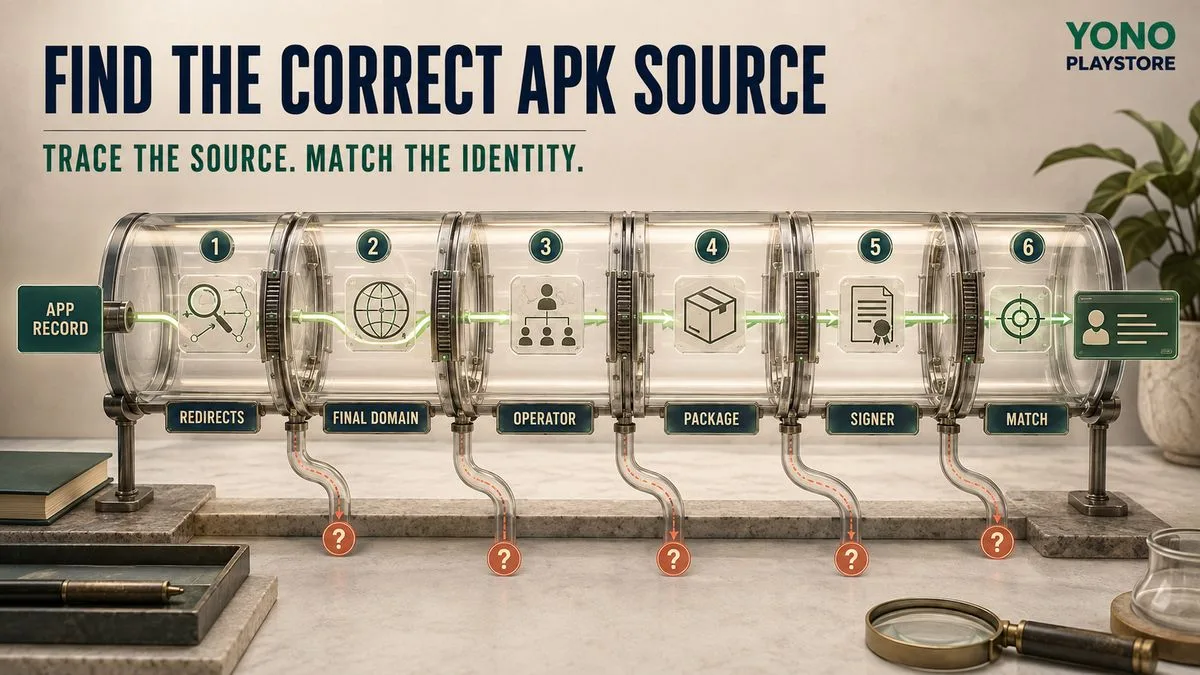
To find the correct APK source for a Yono-named app, first identify the complete app name—such as Yono Rummy, Yono 777, Yono Slots, Yono Arcade, Yono Games or Yono VIP. Open its matching catalog record, then trace the external link through every redirect. Compare the final domain, named operator, privacy and support details, Android application ID or package name and signer. Do not call a source “official” because its URL, filename, icon or message says so. If the stronger evidence is missing, mark the source unresolved.
What does “correct APK source” mean?
A correct source is a traceable route that consistently identifies the app the user intended to find. It connects five layers: Exact record → final domain → operator → Android package → signer “Correct” does not automatically mean safe, lawful, approved by Google Play or guaranteed by Yono Play Store. It means the available evidence points to the same app identity rather than changing halfway through the journey. The generic APK source guide explains provenance for any Android file. This page applies that method to Yono-named apps, where shared first words, numbered variants and changing distribution domains can make the route harder to follow.
Why are Yono app sources easy to confuse?
Several catalog records begin with “Yono,” yet use different qualifiers and supplied destinations. Search results, social posts and forwarded messages can shorten these names to “Yono app” or “Yono APK,” removing the part that separates one record from another. The word after Yono matters:
These names are not interchangeable. A link intended for one should not be used as evidence for another. The Yono app names guide shows how to preserve the complete entity before beginning a source check.
- Yono Rummy is a rummy and card-game record.
- Yono 777 is a numbered arcade or multi-game record.
- Yono Slots is a slots-style record.
- Yono Arcade is an arcade or mixed-game record.
- Yono Games is a broader discovery or multi-game identity.
- Yono VIP is a status-style app record.
Is there one official Yono APK source?
This catalog has not established one universal source for every Yono-named app. A shared word does not prove common ownership, and no relationship to YONO SBI or State Bank of India should be inferred from the name. Treat “official” as a claim that requires evidence. Look for:
When those elements are absent or contradictory, write operator not established or source unresolved. Do not replace missing evidence with confident wording.
- A clearly named organization in the privacy policy and terms.
- Consistent domain ownership or an explained publisher relationship.
- A support address tied to the same operator.
- An Android package and signer that remain stable across updates.
- Documentation connecting alternate or distribution domains.
Yono app source map
The hostnames below are supplied entry destinations recorded by Yono Play Store. They are not declarations of ownership or permanent official status. A redirect can change the final source after publication. | Catalog record | Supplied entry hostname | First identity question | |---|---|---| | Yono Rummy | `yonorummy044.com` | Does the final page and installer preserve Yono Rummy? | | Yono 777 | `uono777network.online` | Does the Uono/Yono spelling change have a documented relationship? | | Yono Slots | `uonoslots.fun` | Does the source explain the Uono spelling and match the Android identity? | | Yono Arcade | `yonoofficial1.com` | Is the “official” label supported by operator evidence? | | Yono Games | `yonogamese.com` | Does the added final letter remain consistent across policies and installer? | | Yono VIP | `uonovipplay.vip` | Do the spelling, operator, account and package point to one service? | Do not publish this table as a static guarantee. Add a review date and recheck each entry link when its app record is updated.
Twelve-step source verification checklist
### 1. Preserve the complete app name Copy the exact name from the search result, message or screen. Include the category word, status word and every number. “Yono app” is not specific enough. ### 2. Open the matching app record Use Yono Games as a discovery point if the qualifier is unknown. Move to the exact record before opening any external link. ### 3. Read what Verified covers Verified describes the editorial review of the catalog page. It does not certify the external APK or operator. Read the limitations before treating the link as a recommendation. ### 4. Record the entry URL Copy the full starting URL and note the date. Keep referral parameters in the audit record, but do not treat them as publisher proof. ### 5. Follow every redirect Write down each hostname in order until the landing page stops changing. A button label can remain the same while the destination changes underneath it. ### 6. Identify the final domain Check the browser address after redirects. HTTPS protects the connection to that domain; it does not prove who controls the service. ### 7. Read the legal documents Open the privacy policy and terms. Record the named organization, service name, contact details, applicable product and account-closure method. Pause if the documents describe another app. ### 8. Compare the support identity A support email on the same controlled domain is one useful signal. A private chat username alone is weak evidence. Never provide an OTP, PIN, password or remote access to verify support. ### 9. Identify the APK host The final website may deliver the file from another host. Record that hostname and look for an explanation of the relationship. Unexplained storage or download domains keep provenance unresolved. ### 10. Compare the Android package and signer The application ID or package name identifies an Android app on the device, while the signer supports the update relationship. Do not use the filename as a substitute. If values are unavailable, label them not recorded. ### 11. Review permissions and protection instructions Keep Play Protect and Android warnings enabled. A source that asks users to disable protections, enable accessibility control, activate device administration or install remote-control software needs a strong explanation—and usually a stop decision. ### 12. Assign a result
Save the result with a date because domains, files and redirects can change.
- Match: record, source, operator, package and signer agree.
- Unresolved: an important source or Android field is missing.
- Mismatch: a core field identifies a different app or organization.
How do you inspect a redirect chain on mobile?
Start by watching the browser address bar as the page loads. After it settles, tap the address bar and copy the complete final URL. Compare the final hostname with the one shown in the app record and legal documents. If several pages flash too quickly to record, do not repeatedly tap the download button. Pause and use a browser or inspection method that can show redirect history without installing the file. The objective is to understand the route, not to race through it. Be careful with shortened links because the visible text may hide the first destination. A messaging-app preview also may not show the final hostname. Open only when you are prepared to verify where it leads.
What should match on the final domain?
| Evidence area | What should be visible | Reason to stop or pause | |---|---|---| | App identity | Exact Yono record name | Name changes to another app | | Operator | Same organization in policies and support | No operator or conflicting names | | APK delivery | Explained first-party or distribution host | File appears on an unrelated host | | Android identity | Expected label, package and signer | Package or signer identifies another app | | Account | Controller, data use and closure method | Registration moves to an unexplained service | | Payments | Defined recipient, balance and withdrawal terms | Recipient or rules belong to another product | On mobile, convert the rows to stacked evidence cards. Keep the observation and action together so users do not need to scroll sideways.
Is the APK filename useful?
A filename can help organize a download, but it is weak identity evidence because it can be renamed. `Yono-Rummy.apk`, `official-yono.apk` or `latest.apk` does not prove the contents, publisher or signer. Compare what Android displays during installation. If the installed label, application ID or requested update behavior points elsewhere, stop. A familiar icon or filename cannot repair a technical mismatch.
How do package and signer checks improve source confidence?
Android’s application ID uniquely identifies an app on the device. APKs must be digitally signed, and the signing identity is part of Android’s update model. Together, these fields help distinguish two files that present the same visible name. A normal update should retain the expected application ID and signing relationship. Pause if the file installs beside the current app, replaces something unrelated, changes signer or requires an unexplained uninstall. These checks do not prove that the operator is trustworthy; they answer a narrower question: does this file continue the technical identity expected for the record?
What if the Yono app moves to a new domain?
A new domain can be legitimate, but migration needs documentation. Look for an announcement or redirect on a previously established source, matching legal documents, consistent support identity and the same Android package and signer. Do not update every old link merely because a private message says the source changed. Record the old and new domains, migration evidence, observation date and unresolved fields. If the chain cannot be supported, keep both sources unconfirmed instead of choosing the newer one by default.
Warning signs in Yono APK source messages
Stop or investigate further when a message:
Promotional urgency is not identity evidence. Complete the source chain before installing, registering or paying.
- Uses only “Yono app” without the complete app name.
- Hides the destination behind a short link.
- Claims “100% official” without naming an operator.
- Says Play Protect or browser warnings must be ignored.
- Demands accessibility, screen control or remote-access software.
- Asks for an OTP, UPI PIN, card PIN or device-unlock code.
- Guarantees a bonus or withdrawal to create urgency.
- Requires another payment to unlock a balance.
- Sends an update whose package or signer does not match.
How should this guide avoid SEO cannibalization?
This page owns the Yono-specific query “Yono app APK source” and the process of selecting a source among similar Yono-named records. The generic source guide owns “how to check an APK source.” The Yono names guide owns “how to tell similar Yono app names apart.” Individual app records own their exact branded searches. Keep those roles separate:
This structure lets Google understand a topic cluster rather than several pages competing to answer the same question.
- Link to the generic guide for full provenance fundamentals.
- Link to the names guide for entity selection.
- Link to exact app records for current record-specific evidence.
- Do not republish an app’s entire page inside this guide.
Final takeaway
The correct Yono APK source is a consistent evidence chain, not the loudest download button. Preserve the complete app name, follow every redirect, identify the final domain and operator, and match the Android package and signer. When the chain is incomplete, “unresolved” is the accurate answer. Check an app record before opening an external source.
Questions people ask
What is the official Yono APK source?+
This catalog has not established one universal official source for every Yono-named app. Choose the exact record and verify the final domain, operator, package and signer.
Does Yono Play Store host APK files?+
No. App records link to external destinations supplied for the catalog. The source and file identity should be checked at the time of use.
Can I trust a domain with “official” in its name?+
Not from the word alone. Confirm the named operator, legal documents, support identity, Android package and signer.
What if a Yono download link redirects to another domain?+
Record the new hostname and repeat the operator, policy, APK-host, package and signer checks. Mark the source unresolved when the relationship is unexplained.
Is HTTPS proof that a Yono APK source is genuine?+
No. HTTPS protects the connection to the domain; it does not establish that the domain belongs to the intended app operator.
What should I do when the package or signer is not available?+
Mark the field not recorded. Do not invent a value or treat the filename and icon as equivalent proof.
This guide explains a verification method. It does not certify every APK, publisher, account, reward, payment or legal status. Apply the checks to the current app and source.